Showing posts with label webcam etiquette. Show all posts

Wednesday, February 11, 2009

WebCam Background and Lighting Tips...

A few thoughts on how to get the most out of your Webcam...  


- Be Aware of Lighting: Since the sensor on even the highest-quality webcam is pretty darn small when compared to, say, a digicam sensor which, again is small compared to a full-frame 35mm DSLR (or actual 35mm frame) we realistically can’t expect too much in the way of dynamic range.  Therefore, we have to have optimal conditions in place to get a good image- to make us look good. 

- Windows Kill: DON’T sit back-to a window- natural light will overpower anything but powerful studio lights.  DO put the webcam BETWEEN you and the window!  This will let you use the powerful natural light to light the subject- YOU.

who is that masked man?

- Get a desk lamp: either point it at yourself (this is a Key light), or at a cube wall so it bounces some light onto your face (this is a Fill light).  In a normal video shoot, there is the classic “3-point” lighting setup- which includes a Key-, Fill-, and Back-light to isolate the subject from the background- but in lighting for a basic webcam conference, you only really need one good light- if you use an advanced video system, you may want to invest in a more professional lighting package.
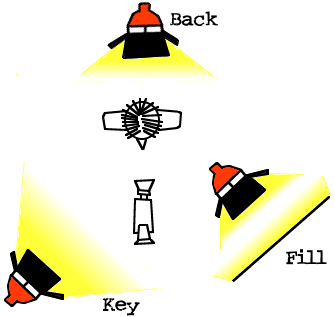

standard 3-point lighting for an interview...  only 1/3
needed for our webcam presentations!

- Background Information:  Sometimes its the little things that tell people the most about us...   Make sure that whatever is behind you is clean & clear, and free of debris.  Make sure to remove any dead plants, KISS posters, or old computer junk.  

- Missed Opportunities...  Now that it's blank, how can we use it?..  I like to think of that empty wall as unused advertising space- space for advertising YOU!  Not sure about this one? All you have to do is flick on CNN, MSNBC, FOX, etc to see how all the major news channels interview in front of cityscapes, cool graphics, bustling newsrooms, or libraries of books.  This adds a level of credibility to the speaker, and communicates even more to the audience.  Take a little time to "pretty up" your area, and think about how you can make your own background advertisement out of the artifacts in your office space- diplomas, degrees, books, plants, framed art, accolades or even magazine covers.  

- The Right Stuff- Don't have a web conferencing tool that will support this kind of webcam video?  Check out WebEx.  I know, you've heard this one before, but there's a reason for it- it works!


Don't forget to check out my post on how to have better web meetings...

- Josh

Monday, February 9, 2009

Tips for better WebEx Conferences - Or Video Conferences in General...

People seem to think that because we've called a meeting, everything will just take care of itself. That's where they're wrong! Meetings require leadership - not necessarily Robert's Rules of Order leadership (egad, shudder to think of those hours spent in the Student Senate...) but some kind of direction. Here are a few pointers, from one who is in/part of/attends a LOT of meetings. Heck, I do work for a company that provides a serious meeting platform...

1. Bring an Agenda (what are we here to do???) Regardless of what the format is - Powerpoint, Keynote, Notepad, etc - make up some kind of bullet list. People LIKE bullets. They like things synthesized for their consumption- the salient, important points. Outline the basic framework of what's supposed to happen in the meeting, and show it to everyone.

2. Show Yourself! - Use your web conferencing tool's video option. This lends seriousness and credibility - if you're not willing to show yourself, it makes people wonder what color your pajamas are (the ones that you're obviously sitting at home in, in front of the television no doubt!). Don't have camera options with your web conference? Get WebEx.

3. Annotate (Draw & Text on the Screen!) Use the marker and text tools to highlight and outline what is important. Change and adjust the agenda, or add to it as people make comments. You can also let your attendees use these tools simultaneously for brainstorming & planning sessions. For example, in our team meetings there is a specific agenda item called "feedback." Our manager opens up a blank slide, and turns on the annotation tools for everyone- then asks us to throw out words and ideas about how he can help us be more successful- with the idea that nothing is off-limits, but that if you put up something heavy, just be ready to discuss!

4. Follow-Through - on movie sets there is a dedicated person who watches for continuity- IE to make sure that props, wardrobe and makeup are consistent from scene to scene. In meetings we need to have similar people- someone who's specific job it is to make sure we have targets set for what happens next. Don't forget to either snap a quick screenshot or record important points of the meeting. If your conferencing provider doesn't offer this option, you can always click "Print Screen" (it's above the number pad) and then Control-V to Paste it into either Word or Powerpoint as a captured image. Also, there are tons of free screen capture tools out there that let you record directly from your desktop, and end up with a video. You can use some of the converter tools from my earlier post to convert to other formats.

5. Encourage Participation - ASK QUESTIONS! "does that make sense," "are we all on board," "does anyone have any questions," "do you think that's a good idea?"


Wednesday, January 21, 2009

Some Basic Tips on Webcam Etiquette…

Okay, I work for WebEx- Cisco-WebEx.  Let me be clear that this isn’t a pitch for our tools, but rather some helpful ideas around WebCam meetings in general.  Think of this as an experienced Web-presenter’s Basic Tips on Webcam Etiquette…


  1. Look Good – seriously, comb your hair.  Put on glasses so you look “smart.”  Have a collared shirt on, at least…  Your audience can’t typically see you in excruciating detail (zits? No big deal!) but they CAN see your most prominent features. 
  2. Find Your Good Side - I’m regularly on meetings with people who have bad angles…  Some look like they’re on the Space Station with their awkward wide-shot cameras, some noses I can almost see UP, and some people facing an entirely different direction from their camera (perpendicular to it, usually).  Look at CNN, see how hosts look are positioned towards the camera.  This lets us see the person from a natural, straight-on angle as though we were meeting with them across the table in “real life”
  3. Get Lit- With cheap webcams or video cameras, light makes all the difference.  Without exception these cameras have a slow/small aperture (F-Stop)- they’re mostly plastic lenses combined with very, very small imaging chips.  That said, Logitech is my personal favorite brand.  I currently use one of these and it’s a great little unit!
  4. Have a “Set”- Again to take a cue from our friends in cable & broadcast news (they set the appearance standards for professional meetings!) it is important to at least have a nice, clean area behind you.  Notice how when lawyers are interviewed on television, they have lots of books behind them- and when reporters are sitting in the studio, there are monitors and producers in the background…  It lends some credibility to the speaker.  Even if you just have a nice plant, or a couple of framed pictures in the background, put something in there- and keep in mind, this is YOU that’s on display, so this will directly affect how people think of you…
  5. Smile!- Hey, it seems easy, but we all forget to do it.  Show your customers or your colleagues that you’re a team player and you’re happy to be here!  People like to see other people smile, and as corny as it sounds, breaking through to your audience with general niceness or carefully positioned humor can really give them a good impression.
  6. Look at the Camera- While you’re smiling, looking good in your collared shirt and sitting in your private studio (get a sweet On Air light if you work at home, so the husband/wife/kids know when to be respectful of your space) remember to actually look into/at the camera.  It’s really the same as looking into your attendee’s eyes- they will think and respond as though you were really talking to them as opposed to an inanimate object that’s sitting on top of your monitor…

And, as always, have fun, and deliver good content to your audience…